Your Ad Can Be AI-Made. It Still Has to Sound Like You.
Field notes · AI, day to day · about 4 minutes
AI-made ad graphics are fast, and small businesses need them. Here's where they lose your brand and voice, and four prompts that keep both in place.
The four prompts
- Teach it your brand.
- Write the brief before the image.
- Make the ad from the brief, with rules.
- Have it check its own work.
The flyer that stopped my scroll
This week a travel flyer came across my feed. A two-day getaway to Nashville, a big gold price burst, a hotel at dusk, three photo panels, a full itinerary, and an inspirational quote in script at the bottom. It was clearly made with AI. It got made fast and it got posted, and that counts for something.
Small businesses need this kind of content. You have a trip to fill, an event to promote, a sale that ends Friday. Nobody has a design team on standby, and AI image tools have made it possible to go from idea to finished graphic in ten minutes. I use them too.
But when I looked at that flyer a second time, I couldn't tell you who was selling the trip.
Where the brand gets lost
AI will make you a poster in seconds. Give it a one-line prompt, though, and it fills every gap with the most generic version of an exciting ad it can find. Here's how that showed up on this flyer, and on plenty of others I see.
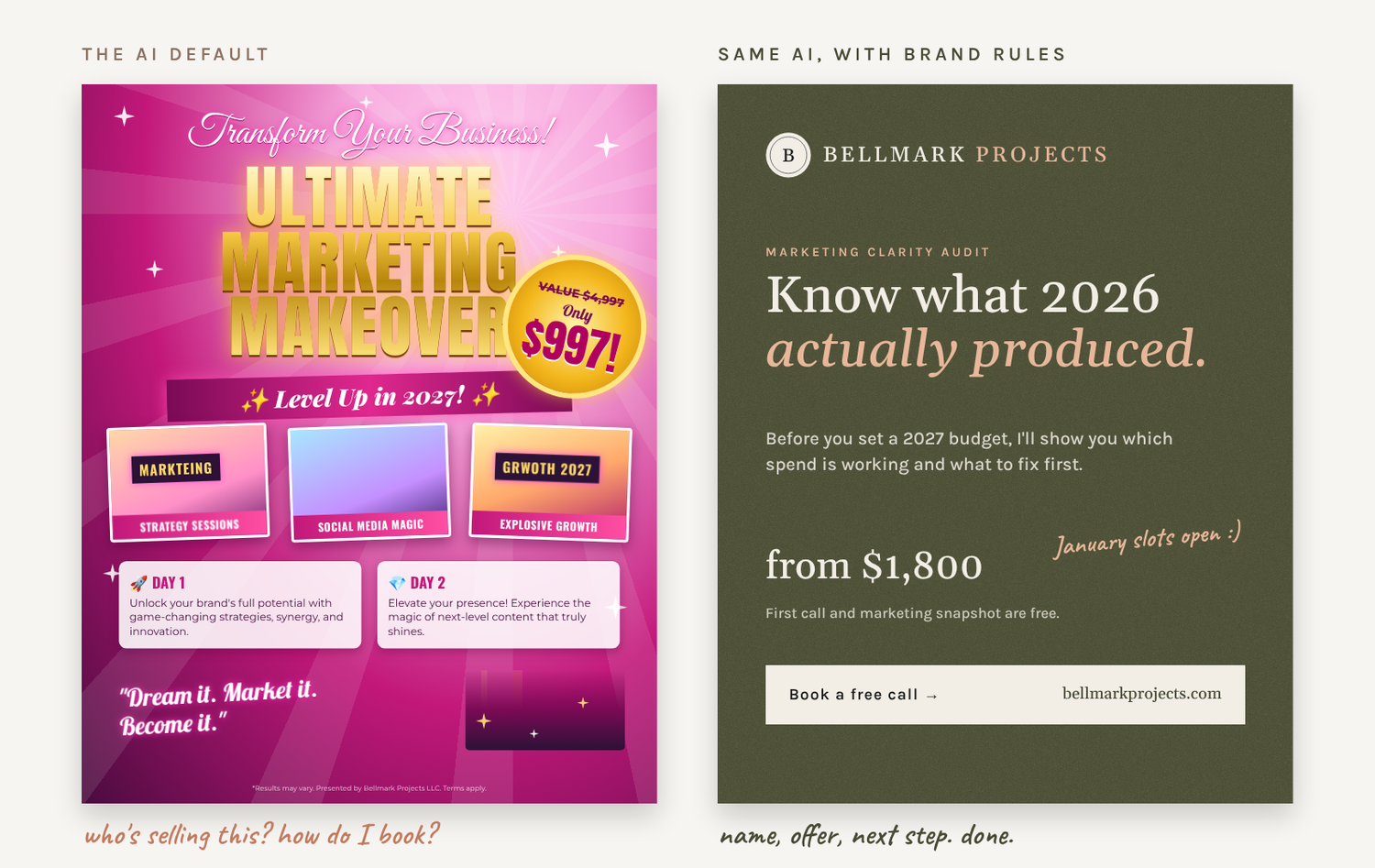
- The business is the smallest thing on the page. The company running the trip shows up once, in tiny type, in the last line of the fine print. The hotel gets the spotlight, and the people who will actually take your money are an afterthought.
- It doesn't sound like anyone. "Experience the magic." "A hub of music, style and hospitality." That's the default travel-brochure voice AI falls back on, and your customers have seen it a hundred times this month.
- There's no next step. A $600 price and nowhere to pay it. No phone number, no website, no QR code, no deadline, no "only 12 seats left." The flyer does the exciting part and skips the part that books the trip.
- Everything is competing for attention. Six or seven type styles, glow effects, banners, icons, a skyline and a script quote. With that much going on, nothing stands out.
- It shows things that aren't real. Look closely and the lettering on the building sign is garbled, and the building itself was imagined by the AI. If a customer shows up and the real place doesn't match, they start the trip trusting you a little less.
Each of these is a brand problem more than a design one. Post like this for a month and your business has plenty of content but no recognizable look, voice, or reason to call you instead of the next tour company.
Also keep in mind that AI image tools will generate a famous person's face or a company's logo if you let them. Putting that in a paid ad without permission is a risk you don't need to take.
Four prompts that keep your brand in the picture
Keep using AI. Just stop asking it for "a poster" and give it the same direction you'd give a designer you hired. Four prompts cover it. Write the first two once, save them, and reuse them every time.
1. Teach it your brand
Do this once and keep it in a saved note or project.
Here is my brand. Business name: [name]. Who we serve: [customer]. Colors: [hex codes]. Fonts: [names]. Logo: [attach]. How we sound: [3 to 5 words, plus two sentences we've actually written]. Words we never use: [list]. Use this for everything I ask you to make.
2. Write the brief before the image
This is the step almost everyone skips.
Help me write a one-paragraph ad brief for [offer]. Include: who it's for, the one thing they should remember, the offer and price, the single action we want (call, book, scan), the deadline, and where it will run ([Facebook feed, Instagram story, printed flyer]).
3. Make the ad from the brief, with rules
Using my brand and this brief, create a [1080x1350 feed ad]. Our name and logo must be clearly visible in the top or bottom third. One headline, under 8 words, in our voice. Price and call to action are the two largest elements after the headline. No more than two fonts. Use [my real photo] instead of inventing the location. Leave clean space for me to add text.
4. Have it check its own work
Review this ad like a skeptical customer scrolling fast. In three seconds, can you tell who is selling this, what it costs, and exactly what to do next? Does it sound like the voice samples I gave you? List what to fix.
Two more habits help. First, use real photos of your actual product, place, or people whenever you have them, and let AI handle layout and background. Second, add the final text yourself in Canva or a similar tool. Image generators still misspell words, and your phone number is the last place you want a typo.
Same questions as always
Good marketing has always come down to the same few questions. Who are we talking to? What do we want them to do? Do they know it's us? AI makes the making part faster. It doesn't answer those questions for you.
So keep making the posters. Just make them look and sound like the business your customers already trust, and make it easy for them to say yes.
Sound familiar?
Want ads that still look and sound like you?
If you'd like help setting up a brand kit and a set of prompts your team can reuse for every promotion, that's the kind of thing I build at Bellmark. It usually starts with a short conversation.
Start a conversation